

Why Spelling Practice Apps Are Game-Changers for Busy Families
Spelling practice apps have transformed how kids learn and practice spelling words, turning what used to be tedious homework battles into engaging, interactive experiences. Here are the top benefits that make these apps essential tools for modern families:
Quick Answer for Parents:
- VocabularySpellingCity – Best overall with 40+ learning games and proven results (21.5% reading comprehension improvement)
- DoodleSpell – Perfect for UK curriculum alignment (ages 5-11) with offline access
- ABC Spelling – Ideal for preschoolers (completely ad-free)
- Scholar: Spelling Bee Quiz – Great for competition prep (4.8-star rating)
- SpellSmart – Excellent for ESL families with advanced text-to-speech technology
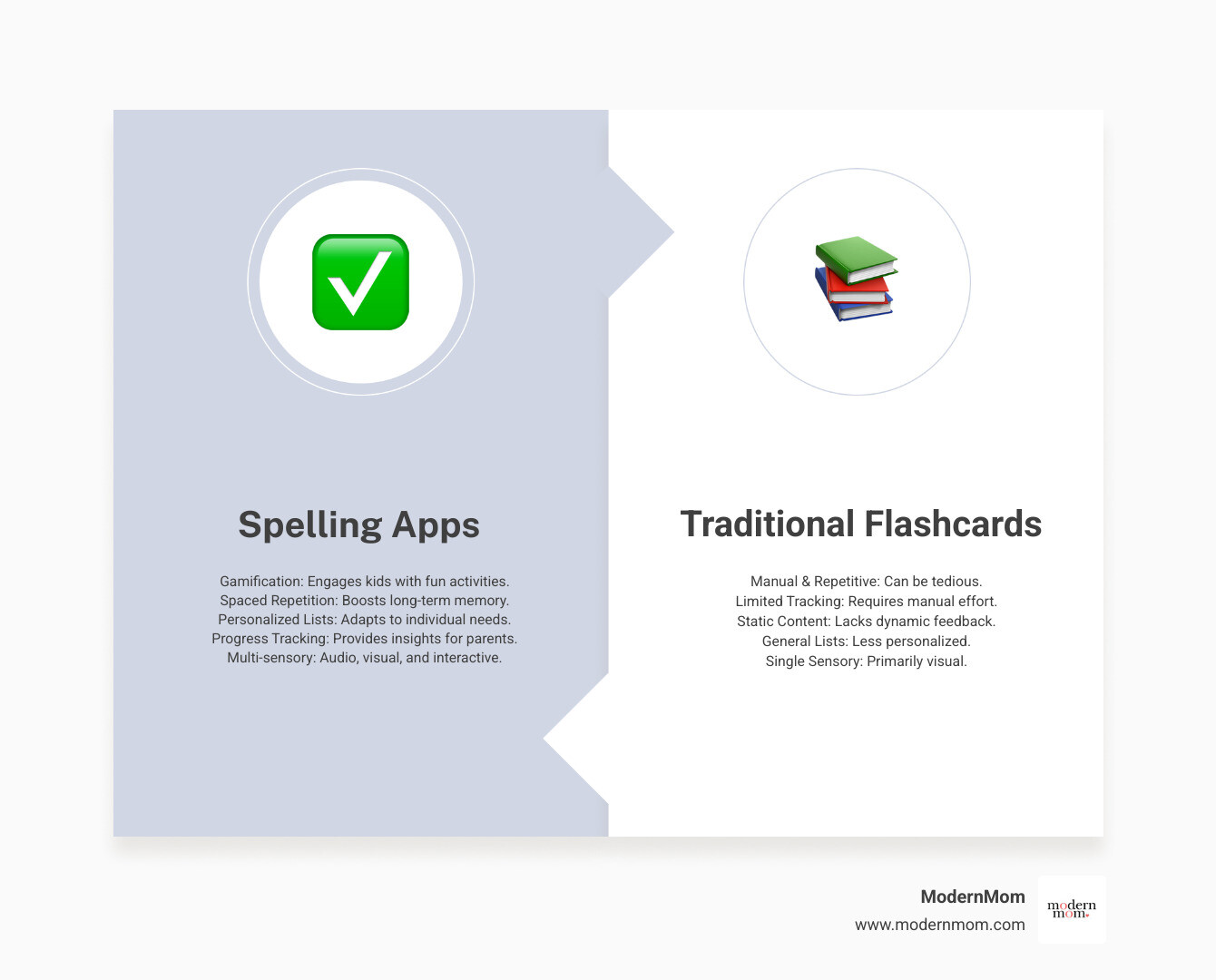
Gone are the days when spelling practice meant sitting at the kitchen table with flashcards while dinner burned on the stove. Today’s spelling apps use spaced repetition, gamification, and personalized learning to help kids master words more effectively than traditional methods.
The magic happens when apps track misspelled words automatically and create custom practice lists for your child’s weak spots. Many apps also let you upload your child’s actual school spelling lists, so they’re practicing exactly what they’ll be tested on Friday morning.
Studies show that apps using spaced repetition – where missed words are retested at specific intervals – dramatically improve long-term retention. Plus, features like audio pronunciation help families where English isn’t the first language support their children’s learning independently.
Whether your child is just learning letter sounds or preparing for the school spelling bee, the right app can turn frustrating homework time into something kids actually look forward to.
What to Look For in a Great Spelling App
Walking into the app store looking for spelling practice apps can feel like being dropped into a digital toy store with a hyperactive toddler in tow. There are so many colorful options screaming for attention that it’s hard to know where to start.
The good news? You don’t need to download dozens of apps to find the perfect fit. Instead, focus on a few key features that actually make a difference in how kids learn and how much sanity you retain during homework time.
Personalized learning is your first must-have. The best apps adapt to your child’s pace and skill level, so your kindergartner isn’t frustrated with middle school vocabulary, and your confident speller isn’t bored with basic words. Look for apps that adjust difficulty automatically based on how your child performs.
Age-appropriateness goes beyond just the word difficulty. Younger kids need bigger buttons, simpler navigation, and shorter practice sessions. Older kids can handle more complex interfaces and longer challenges. The learning approach matters too – some apps focus heavily on phonics (great for early readers), while others emphasize whole word recognition or vocabulary building.
Custom word lists are a game-changer for busy families. Being able to upload your child’s actual school spelling list means they’re practicing exactly what they’ll be tested on Friday morning, not random words chosen by app developers.
Progress tracking for parents saves you from the daily “How did spelling practice go?” interrogation. Good apps show you exactly which words your child is struggling with and how much time they’ve spent practicing. Gamification features keep kids coming back – think badges, points, and fun challenges that make spelling feel more like playing than studying.
Don’t overlook accessibility options either. Features like adjustable font sizes, dyslexia-friendly fonts, and audio support ensure every child can succeed, regardless of their learning style or needs. For more guidance on supporting kids with diverse learning needs, check out our resource on special educational needs.
Key Features That Make a Difference
Once you’ve narrowed down your options, these specific features separate the truly helpful spelling practice apps from the digital clutter taking up space on your device.
Phonics vs. whole word approaches each have their place. Apps like ABC Spelling focus on phonics, teaching letter sounds and how they blend together – perfect for early learners who are just figuring out that “c-a-t” makes “cat.” Other apps use whole word recognition or combine both methods. The best apps offer multiple approaches because kids learn differently.
Spaced repetition is where the real learning magic happens. This feature automatically brings back words your child missed at specific intervals – just when they’re about to forget them. Apps like Scholar: Spelling Bee Quiz use this technique brilliantly, and parents consistently report seeing real improvement in their kids’ retention.
Dyslexia-friendly fonts and other accessibility features make apps more inclusive. While not every app advertises these features prominently, the best educational apps include options like adjustable color contrast and audio support that help kids with different learning needs succeed.
Parent dashboards give you the transparency you crave without turning you into a helicopter parent. Apps like DoodleSpell offer clear overviews of your child’s progress, time spent practicing, and specific areas where they need extra help. No more guessing games about whether practice time was actually productive.
Ad-free options are especially crucial for younger kids who can’t resist clicking on every colorful distraction. ABC Spelling stands out for being completely free with no ads or surprise purchases – a rare find that lets kids focus purely on learning.
US vs. UK spelling flexibility matters more than you might think. Apps like SpellStar let you toggle between “color” and “colour” depending on your family’s needs or your child’s school requirements. Some even offer regional pronunciations to match.
Offline access is your secret weapon for maintaining practice routines during car trips, doctor’s appointments, or when your internet decides to take an unscheduled break. Apps like DoodleSpell work seamlessly across devices whether you’re connected or not, ensuring consistent practice no matter where life takes you.
Finding the Right Spelling Practice App for Your Child

Just like finding the perfect pair of jeans (you know, the ones that actually fit after washing), choosing the right spelling practice app for your child takes a bit of trial and patience. What works brilliantly for your neighbor’s kindergartner might leave your third-grader yawning, and that’s completely normal.
The secret is matching the app to where your child is right now – not where you think they should be or where their cousin excels. A preschooler who’s just finding that letters make sounds needs something totally different from a middle schooler preparing for the regional spelling bee.
Let’s walk through what works best for each stage, so you can skip the guesswork and get straight to the apps that’ll actually help your child succeed.
For Early Readers (Ages 4-7)
These little sponges are soaking up everything, but their attention spans are shorter than a summer rainstorm. The best apps for this age group focus on phonics-based games that teach letter sounds naturally. ABC Spelling – Spell & Phonics consistently gets rave reviews from parents who see real improvements in their children’s reading and spelling – plus it’s completely free and ad-free, which means no accidental purchases during your morning coffee.
Letter tracing activities help develop those crucial fine motor skills alongside spelling recognition. Look for apps that let kids build simple words by dragging and dropping letters – it’s like digital building blocks for literacy.
Positive audio reinforcement makes all the difference at this age. Clear, encouraging voices that celebrate every small win help build confidence. Word Beach: Fun Spelling Games (rated 4.5 stars) combines learning with a relaxing beach theme that keeps kids engaged without overwhelming them.
The key is colorful interfaces with minimal distractions. No pop-ups, no complex menus – just pure, focused learning that feels like play. Think of it like watching your baby find their own hands – that same wonder and excitement should carry into their spelling journey. Speaking of early development milestones, you might enjoy reading about Help Your Baby Find Their Hands.
For Elementary School Kids

This is where things get real – and by real, we mean homework lists and Friday spelling tests. Elementary kids need apps that work with their school curriculum, not against it. Custom school lists become your best friend here. Apps like A+ Spelling Test, SpellingCity, and Spelling Notebook let you input those exact words from your child’s weekly homework, turning practice time into targeted preparation.
Curriculum alignment takes the guesswork out of what your child should be learning. DoodleSpell, designed for ages 5-11, aligns perfectly with the UK National Curriculum and goes beyond simple memorization to teach word formation and sentence structure. It’s like having a personal tutor that never loses patience.
Vocabulary building becomes crucial at this stage. VocabularySpellingCity offers over 40 learning games and shows impressive results – studies report a 21.5% increase in reading comprehension. The app includes definitions, example sentences, and pronunciation help, supporting overall language development.
Gamified quizzes keep the motivation high when homework fatigue sets in. Popular activities like Spelling TestMe and HangMouse make practice feel more like play time than work time. The Spelling Games app by Prasanna G recently added dictionary features based on parent feedback – proof that good apps keep evolving.
For weekly test prep, apps like A+ Spelling Test let you record your own voice saying the words (kids love hearing mom or dad through their headphones), and the “Ace it” mode ensures they practice until they get it right.
For Older Kids and Confident Spellers
Pre-teens and competitive spellers need apps that challenge them without talking down to them. Advanced vocabulary becomes the focus, with apps like SpellStar SAT introducing SAT and GRE-level words complete with meanings and context.
Challenging word lists and timed challenges simulate real competition pressure. SpellStar SAT includes daily challenges with 10 new words, and even lets kids share their scores on social media (because what middle schooler doesn’t want to brag about spelling prowess?).
The best apps for this age group include study tools for independent learners. Spelling Notebook: Learn, Test (4.6-star rating) gets praise for helping kids improve on their own, with features like custom word lists and pronunciation recording. TurboWords Spelling is specifically valued for spelling bee preparation, while SpellSmart offers preloaded UIL word lists and both “Buddy Mode” for family practice and “Solo Mode” for independent work.
These older kids appreciate apps that track their word origins and morphology – understanding why words are spelled certain ways helps them tackle unfamiliar vocabulary with confidence.
Navigating these pre-teen years requires patience and the right tools for building independence. For more support during this challenging stage, check out How to Raise a Teenager Without Losing Your Mind.
Making Screen Time Count: Tips for Using Spelling Apps Effectively

Let’s be honest – screen time feels like walking a tightrope some days. We want our kids to benefit from amazing educational tools like spelling practice apps, but we also worry about too much digital exposure. The good news? When used thoughtfully, these apps can transform screen time from mindless scrolling into meaningful skill-building.
The secret isn’t avoiding technology – it’s about creating intentional habits around it. Think of it like cooking: the right ingredients in the right amounts create something nourishing, while random ingredients thrown together… well, you know how that turns out.
Setting Up for Success
The magic happens when we approach spelling practice apps with a plan. Just like we create bedtime routines or morning rituals, establishing tech routines helps kids know what to expect and makes learning feel natural.
Setting a routine makes all the difference. DoodleSpell suggests just 10 minutes a day, proving that consistency beats marathon sessions every time. When spelling practice becomes as regular as brushing teeth, kids stop seeing it as extra work and start viewing it as part of their day.
The “little and often” approach really works. Instead of cramming before Friday’s spelling test, those daily 10-minute sessions build genuine understanding. It’s like watering a plant – a little bit regularly keeps it thriving, while drowning it once a week doesn’t help anyone.
Reviewing mistakes together turns errors into learning opportunities. Apps like A+ Spelling Test and SpellSmart automatically track misspelled words, giving you a roadmap for focused practice. SpellSmart is particularly helpful here – it creates custom practice lists from your child’s trouble spots, so you’re not wasting time on words they already know.
Here’s where many of us need a mindset shift: celebrate progress, not just perfection. When your child improves from 6 out of 10 to 8 out of 10, that’s huge! Apps like DoodleSpell are designed to reward effort over ability, ensuring every child experiences ongoing success. Your encouragement, though, remains the most powerful motivator of all.
Mixing up practice modes keeps things fresh and engages different learning styles. If your app offers various activities – like A+ Spelling Test’s “Ace it,” “Practice,” and “Unscramble” modes – encourage your child to try them all. Some kids learn better through repetition, others through games, and many need both.
Balance is key. While spelling practice apps offer incredible benefits, it’s worth being mindful of your child’s overall relationship with technology. If you notice signs of stress or anxiety around screen time, our article Does Your Child Suffer from Technology-Induced Anxiety? offers helpful guidance for finding that sweet spot between digital learning and well-being.
Frequently Asked Questions about Spelling Apps
As moms, we’re natural worriers – especially when it comes to screen time and our kids’ learning. You’ve probably found yourself wondering whether these spelling practice apps actually work, if they’re safe for your little ones, or how to make them work with your child’s weekly school lists. Let’s tackle these common concerns together with some straight talk and expert advice.
Can spelling apps really replace traditional practice?
Here’s the honest truth: while spelling practice apps are incredibly powerful tools, they work best as partners with traditional methods, not replacements. Think of it like cooking – you wouldn’t throw out all your pots and pans just because you got a fancy new appliance, right?
Apps bring unique strengths to the table that flashcards simply can’t match. They provide instant feedback, keeping kids engaged without you having to hover over their shoulder. The gamification features turn what used to be a chore into something kids actually want to do. Plus, spaced repetition technology ensures those tricky words get reviewed at just the right intervals for maximum retention.
But there’s still magic in the traditional methods. Writing words by hand helps develop fine motor skills and creates different neural pathways for memory. Having your child use new words in sentences or engaging in good old-fashioned dictation provides contextual understanding that apps can’t fully replicate.
The sweet spot? Blending both approaches. Use apps like VocabularySpellingCity, which employs a “Read, Hear, Speak, Write, Break Down, & Play With Words” methodology to engage multiple senses. Then reinforce that learning with handwriting practice or creative writing exercises using those same words.
What’s particularly exciting is how apps can make kids more independent learners. Instead of you having to drill them every night, they can take ownership of their practice time while you’re making dinner or helping siblings with homework.
Are free spelling apps safe for kids?
The word “free” when it comes to kids’ apps should make us pause and ask questions – and that’s exactly the right instinct. Most free apps aren’t truly free; they’re using what’s called a “freemium” model.
Many apps offer basic features for free but lock the good stuff behind in-app purchases or subscriptions. Spelling Games, for example, is free to download but offers various subscription options for full access. The key is having conversations with your kids about these paywalls before they start using the app independently.
For younger children especially, we recommend seeking out truly ad-free options like ABC Spelling – Spell & Phonics. Ads can be distracting at best and inappropriate at worst, pulling kids away from their learning zone. If you love a free app that has ads, look for a reasonably priced option to remove them.
Here’s what we always tell parents: read the privacy policy. Yes, it’s boring, but understanding what data is collected and how it’s used is crucial. The developer of Spelling Games, for instance, may collect contact info, usage data, and diagnostics. Look for apps that are compliant with COPPA (Children’s Online Privacy Protection Act), especially for younger users.
Don’t forget to use your device’s built-in parental controls to manage screen time, block in-app purchases, and filter content. And always preview the app yourself before letting your child dive in independently.
How do I add my child’s school spelling list to an app?
This is where spelling practice apps really shine for busy families. Instead of creating your own flashcards or trying to remember which words your child struggled with, you can input their exact school list and let the app do the heavy lifting.
Most quality apps like A+ Spelling Test, SpellingCity, Spelling Notebook, TurboWords Spelling, and DoodleSpell offer a custom list feature. You’ll usually find this option in a parent or teacher section within the app or on the companion website.
The most straightforward method is simply typing each word from your child’s school list into the app. A+ Spelling Test even checks your spelling as you type, which is helpful for those tricky words you might second-guess yourself on.
Here’s a feature that parents absolutely love: recording your own voice for each word. Apps like A+ Spelling Test and Spelling Notebook let you do this, which is especially helpful for words with unusual pronunciations or for kids who respond better to familiar voices.
Some apps take it even further with sharing capabilities. A+ Spelling Test and SpellStar allow you to import or share custom lists between devices or even with other parents and teachers. MySpellStar supports custom word lists in 25 languages with iCloud sync between iOS devices. SpellSmart automatically tracks misspelled words to create custom practice lists, so your child can focus on their trouble spots without you having to manually identify them.
Conclusion
Spelling practice apps have the power to transform those dreaded homework battles into moments of genuine learning joy. When we see our children light up while mastering tricky words through colorful games and engaging challenges, we know we’ve found something special.
Every child deserves to feel confident about their spelling abilities, whether they’re just starting to sound out simple words or preparing for the school spelling bee. The beauty of today’s apps lies in their ability to meet each child exactly where they are – offering phonics-based games for our youngest learners, curriculum-aligned practice for elementary students, and advanced vocabulary challenges for our confident spellers.
What makes these tools truly powerful isn’t just their technology – it’s how they fit into your family’s real life. When you can upload your child’s actual school spelling list during those hectic Sunday evenings, or when your little one practices independently while you’re making dinner, these apps prove their worth as genuine family helpers.
The right spelling practice app becomes more than just another screen activity. It builds genuine confidence, creates positive learning habits, and yes – it can even make spelling fun. From the completely ad-free experience of ABC Spelling for our preschoolers to the comprehensive progress tracking that helps us stay connected to our older kids’ learning, there’s truly an app designed for every family’s needs.
You’re not just choosing an app – you’re choosing a tool that supports your child’s growth and makes your parenting journey a little easier. That’s what we call a win-win.
Ready to explore even more ways to keep your family organized and thriving? Find more great planners and apps for students here – because every step forward in your child’s education is worth celebrating.